Search Results for: ipad

iCade for Apple iPad

If you want to play games on the Apple iPad then perhaps one of these funky cabinets should be on your shopping list. Each is designed to dock the iPad on the front and provides old style arcade controls to play games on such as Donkey Kong.

To get the iCade working for iPad you need to download a free application on your iPad that allows it to interface with the cabinet. Once installed you simply dock your Apple iPad and load up the application. Full specifications can be found after the jump. [Read more…]
Apple iPad Unboxing Video

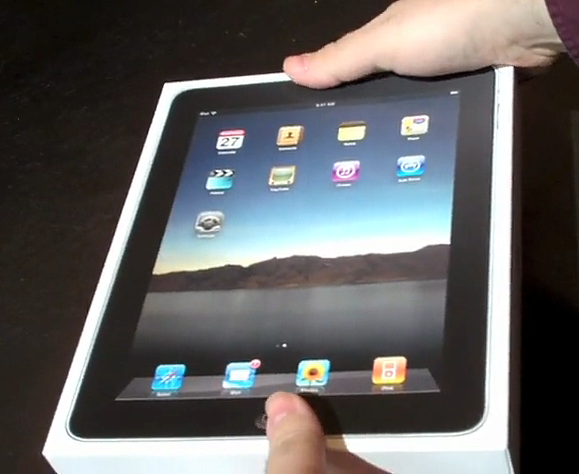
Now the Apple iPad Reviews have been done by large publications, it’s now time for an Apple iPad unboxing. Thanks to Stephen Fry and Cali Lewis, we have two unboxing videos to present to you. The first one on display below is done by Cali Lewis and shows everything that’s in the box along with an entertaining dialogue along side it. Remember that as it’s April 1st, you can also watch the video in YouTube ASCII if you wish…

[Read more…]

Apple iPad Review Roundup

Various web sites have managed to review the Apple iPad yesterday to give it the full run down and to also see if it lives up to the hype of it being magical and revolutionary. Initial reports seem to indicate that Apple have nailed it much like they did when the Apple [AAPL] iPhone first launched in 2007.

The Apple iPad review from Walt Mossberg (AllThingsD) indicates that for many the Apple iPad will work very well. If you want to browse the web, use social networking, send email and use day to day tasks it’s ideal for you. Walt did however point out that it had a number of restrictions such as there being no webcam for video calls which some might have liked to use the device for. In regards to the 10 hour battery life claimed by Apple (which some expected to be lower), Walt actually managed to get over 11 hours of usage out of it when testing from 6am till after 5pm playing videos back to back and surfing, emailing etc… That’s quite impressive considering most companies over estimate when it comes to battery life. [Read more…]

Apple iPad will get Dropped – A Flow Chart Proves it

Gizmodo have created a funny flow chart showing that your brand new Apple iPad [AAPL] will one day get smashed. The process is simple in that it starts the flow chart off by asking “Did you buy an iPad?”. If you answer no it says you will do soon, if you answer yes it leads you on to dropping other gadgets and the likeliness of dropping the iPad.

Of course it’s all good fun but the chart always ends up at the point where you’ll get an iPad anyway and you will drop it one day.

A larger image is below for you to take a look through… so don’t say you weren’t warned when you eventually drop yours. [Read more…]

Google Docs for iPad Coming Soon through Memeo Connect Reader

Memeo have created an app for the Apple iPad called Memeo Connect Reader that allows you to browse your Google Docs on your iPad. The application is going to be free when launched this Saturday along side the launch of the iPad.

The software allows users to download and natively use their docs stored on Googles [GOOG] Docs service. Documents are all viewed through the default iPad document viewer that has been integrated with the Connect Reader app.

As mentioned above, the application downloads the most recent docs to your iPad. To get started you install the application and when installed, load it up. You’ll then be presented with a login box where you enter your Google Docs username and password. Once logged in, the Apple [AAPL] device will start getting documents downloaded on to it. If you loose connection whilst out and about you can still view documents while on the move and when a connection is restored the docs are then resynced from Google Docs so you always have the latest documents with you. [Read more…]

Apple iTunes 9.1 Lands with iPad and iBooks Support

Apple [AAPL] have released their latest version of iTunes numbered 9.1. The new update brings several features which includes support for iPad syncing as well as the ability to sync books that you have downloaded for the iBooks application.

Other features in the update include the ability to rename Genius music lists as well as a few changes to the naming of certain places such as Applications changing to just Apps.

The new download is 97.3MB and is available and appears to be downloadable from out of the US too (tested and working in the UK). [Read more…]

Best Buy to get 15 iPads per Store – Rumor

The leaked Best Buy document has been found to mention that on launch day Best Buy will only have 15 Apple iPads available per store (those stores that sell it) to buy. That makes it five of each device as in 5 16GBN models, 5 32GB models and 5 64GB models.

None will be made available on the website to buy in the beginning and it is believed that once those 15 Apple iPads have sold that the next batch wont arrive till April 11.

This information all relies on the accuracy of the leaked documents though, but looking at the Apple site it does mention that all pre-orders that are made now wont be honoured till April 12 which indicates a lot of the Apple iPads have already been purchased. [Read more…]

Apple iPad Guided Tours Launched

Apple [AAPL] have opened up a new section on the Apple website called Guided Tours that basically goes through the various functions of the iPad in detail on video.

The video covers the following sections of the iPad… Safari, Mail, Photos, Videos, YouTube, iPod, iTunes, iBooks, Keynote, Pages and Numbers.

Each video lasts a few minutes and gives a full tutorial on how the iPad applications work and samples of what can be achieved.

Interesting applications toured include Keynote that allows you to create presentations on the go as well as demonstrating a device that allows the iPad to be connected to a HDTV or projector. The Pages application brings a word processor to the iPad and Numbers brings a spreadsheet app to the iPad. [Read more…]

Apple iPad Camera Connection Kit Ready for Pre-Order

Apple [AAPL] in the US now have the iPad Camera Connection Kit available for pre-order on their website with a price tag of $29. In that price you get a couple of iPad camera connection devices.

The first connector (30 pin of course) features a USB port allowing you to connect up either your digital camera or iPhone direct to the iPad. When connected an application automatically loads up displaying thumbs of images that are available on the camera or iPhone to download. You can then select what you want to copy over. Images are then synced with your PC or Mac is required.

The next connector is almost the same but instead of connecting the camera direct to the iPad it features an SD card slot allowing images to be read directly from the memory card containing pictures. The same app (Photos) is opened up and the same interface. [Read more…]

Apple iPad Confirmed to Launch at 9am at Apple and Best Buy Stores

Apple [AAPL] have officially announced where the Apple iPad will be available to buy this weekend and at what time. Sales start in ALL US Apple Stores (211 of them) at 9am and a number of Best Buy stores also at 9am.
‘iPad connects users with their apps and content in a far more intimate and fun way than ever before, said Steve Jobs, Apple’s CEO. ‘We can’t wait for users to get their hands and fingers on it this weekend.

When purchasing the Apple iPad in store the staff will provide a personal setup service that will allow them to download their applications and set up email etc… right in the store. Also iPad workshops are being set up to help users learn about the “magical new product”. [Read more…]

Apple iPad App Store on Video

Yes, there’s going to be plenty of Apple iPad news this week although we’ll try keep it to just 2 or 3 per day out of the 20 or so news items per day we post… at least we hope to keep it to just that.

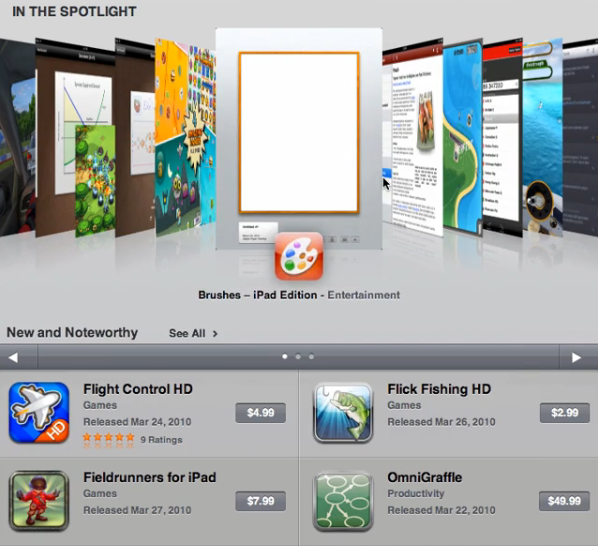
The next bit of info we have spotted shows someone browsing through the Apple iPad app store looking through the various HD and iPad applications that they are revealed as being named as.

Not much works in the app browser although the user can flick through applications and select them to view a write up of what the application is about. However, a number of the buttons do not work which includes the ability to Sign In, Redeem or use Support. [Read more…]

Apple iPad Flash Problems partially solved by Brightcove

The Apple iPad lacks flash as you are probably already aware of. That does upset a number of people who want to use a larger screen tablet device to browse the web and yet, they see boxes asking for Flash to be installed.

A number of companies are switching video content over to use the new HTML5 specification that allows videos to play back in the browser (including the iPhone and iPad browser).

Brightcove are getting in on this by creating software that websites can use to play Brightcove videos which use the HTML5 spec and can work on devices such as the Apple iPad and iPhone.

The software uses auto-detection and can switch over the video to be compatible if it recognises the device cannot use flash. [Read more…]