From the monthly archives:

October 2007

Spoke POV – Cool LED’s for your Wheels

by Matthew on October 31, 2007

Spoke POV
POV (Persistence of Vision) is a cool thing which creates an illusion of motion when something moves fast. A spoke on a bike wheel is something that can move fast and this is why the Spoke POV has been created. You attach an LED device to the spokes on your bike and program it to display text on your wheel. As the wheel spins you can see the text floating in the air. To change the text on the wheel you hook up Spoke POV to your computer via USB where you can send new patterns or text down for the next time it is attached to your bike. It’s kind of a cool little toy to have. You can check out more details over at GeekAlerts.

Via: EverythingUSB


Homemade Night Vision Digital Camera

by Matthew on October 31, 2007

Homemade Night Vision Camera
If you want to get hold of a night vision camera then you could choose the option of converting a webcam or digital camera with easy and cheap to buy parts. To create a night vision camera you need a processed photo negative, superglue, screwdrivers, LED flashlight, infrared LED’s, soldering iron, solder and a few resistors. I wont go in to full details here as you can check out full instructions at archonmagnus. The basic process is that you carefully take apart your camera, slide the negative over the CCD and put it all back together and then attach the LED’s and you should be good to go.

If you do make one then be sure to send some pics in as I want to see how the pictures turn out.


Skypephone Review

by Matthew on October 30, 2007

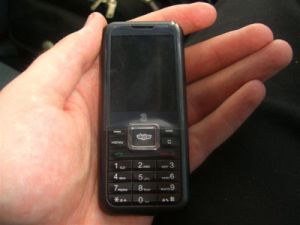
Skype Three Phone 2
On Monday I attended a press event in London where Three and Skype introduced the Skypephone. The Skypephone was described as having Skype in your pocket. I do not want to go over the details of the actual event here. I am more interested in the actual phone it’s self and how the Skypephone is different to any other phone you have used. For details of the actual event I have compiled a list of web sites who have written about the event. You can find the sites listed at the bottom of the review. Now on to the review.

When first opening the box of the Skypephone I was immediately impressed at how small and light the phone was. It weighs just 86g and measures 100 x 44 x 13.6 mm which is very comfortable to hold. The phone is available in 3 colour options. All black, white/blue and white/pink. The 2 Skypephones GadgetVenue received for testing are both black.

The phone costs £49.99 on a PAYG (Pay as You Go) tariff. With PAYG you need to top it up with at least £10/month to get the 4000 free Skype to Skype minutes and 10000 chat sessions. Calls are 12p per minute to regular landlines in the UK (numbers beginning 01, 02 and 03) and the same cost to send SMS messages.

If you opt for the contract version then the phone is free on a £12/Month 18 month contract. With this you get 4000 Skype to Skype minutes, 10000 chat sessions and 100 free minutes or SMS messages. Other options with generous minutes are available to choose from. Details and pictures of the phone are available after the jump.

[click to continue…]


GPS Mouse – A Worlds First?

by Matthew on October 30, 2007

GPS Mouse
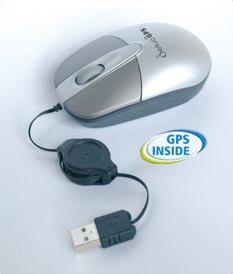
When thinking about what devices would work well together such as an MP3 player and phone, you probably wouldn’t think of putting a GPS receiver in a mouse. This is what Deluo have done and created what is possibly the worlds first GPS mouse (I have yet to confirm that). Adding a GPS to a mouse seems a little odd, but at the same time it could work well for people who regularly carry a laptop around and need to quickly check where in the world they are. The GPS receiver can track on 16 channels and the mouse has a retractable USB cord allowing you to keep the cables neat when traveling. Power to the GPS mouse is provided by USB so that no batteries are required.

The DeluoGPS Mouse costs $94.34 currently at Amazon. This version comes with Microsoft Streets.

Via: DeluoGPS


Worlds Smallest full HD LCD TV

by Matthew on October 30, 2007

worlds smallest HD TV
With the fight on to create the largest HDTV it seems many forget that not everybody wants a 102″ screen hanging on their wall. Sharpe have jumped in to a gap and created a 22″ HDTV which is supposedly the smallest 1080p HDTV available. The 22V will cost about £730 when it is launched with a couple of other models in the series also going on sale which are a 26 inch version and 32 inch version (I assume named the 26V and 32V).

However, if money is the deciding factor and not size then I would go for the larger screen as they cost about the same anyway.

Via: Gadgettastic


iPod USB Turntable

by Matthew on October 30, 2007

ipod-usb-turntable
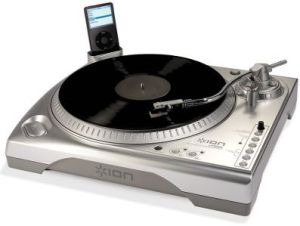
The iPod USB Turntable is an MP3 converting device with an iPod dock attached. It allows you to play records at 33 1/3 rpm or 45 rpm and record the music direct to the docked iPod. The dock is compatible with 5th Gen iPods or 2nd Gen Nano’s. The turntable it’s self is a belt driven device with anti-skating control. Also an output is provided allowing you to play your old vinyl records to a stereo system. USB support is also provided allowing you to create MP3’s from your vinyl rather then recording them right on to the iPod.

The iPod USB turntable costs $260.

Via: GeekAlerts


Skype & Three Mobile Phone

by Matthew on October 29, 2007

Skype Three Phone 1

Here is the new Mobile Phone coming from Three and Skype. We were able to get our hands on a couple of them to give them some testing.

The phone has a 2 Megapixel camera, 3G connectivity 256Mb of inbuilt memory and can search the mobi-web. The phone also features a dedicated ‘Skype’ key to allow you to see which contacts are online. Charging is done via usb, which is always handy!

The phone is free on 18month contracts or £50 on Pay As You Go (PAYG). Currently these models we have do not feature Skype In or Out, and No video calling, but we are told that these will be working in the future. Each month you get 100 minutes/texts and 10,000 chat session instant messages.

Of course, you get a Three number and a regular sim-card to use the phone as a normal mobile phone. Apparently though, if you go abroad and want to use it you may be subject to Roaming Charges! (Be warned)

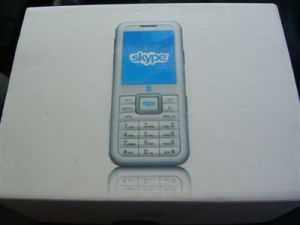
The phone packaging states that it is made by Amoi, and designed by Three and Amoi together.

This is only a quick glimpse of the phone, and a full review will be here within a couple of days, so check back to see what our findings are. We will let you know the battery life, camera quality and all those other things you NEED to know before you buy one!

From our initial findings it seems like a nice, easy phone to use which looks like it may well be a good smooth integration between Three and Skype.

Skype Three Phone 2

Skype Three Phone 3


Hoverwing – A Flying Hovercraft

by Matthew on October 29, 2007

Hoverwing
A cool hovercraft named the hoverwing has been created by a bloke named Rudy Heeman in New Zealand. This hoverwing is a hovercraft with wings attached which allow it to fly over 6 feed above the water. It takes off at top speed which is 60MPH. It has taken a long time to perfect and looks quite fun to fly although in the making he was injured although this didn’t stop Rudy from continuing on. There is space for 1 passenger. Would you fly with Rusy on the hoverwing?

Via: Newlaunches


Starwars Hologram
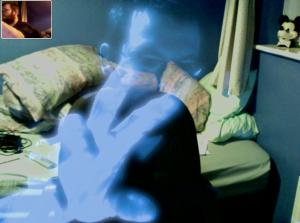
iChat was supposed to have a Star Wars hologram effect in Leopard, however, this was missing as it didn’t make it to the final cut. A mod has been made to create this effect in iChat. To get it to work you need to copy the install file over on to your computer by following the instructions below. Good luck and let us know how it works for you if you are a Leopard user.

You simply copy the .qtz file into your {HardDriveName}/Library/Compositions/ directory. The new effect will appear in iChat and can be seen by anyone (they don’t have to install the effect). An early version of the effect is available in this thread.

Update: Ice-Cube posts how to get this effect into PhotoBooth:

1. Extract HoloGit.qtz from the zip file.
2. Place it on your desktop for easy access.
3. Go to photobooth in your applications folder and right click to *Show package contents*
4. Navigate to content>resources
5. Drag the HoloGit.qtz file from the desktop to this folder.
6. Locate the file *EffectsOrdering.plist* in this folder
7. Open the file with textedit
8. You should see a number of effects listed in that file. You should see user backdrop 1, user backdrop 2, and so forth in the last paragraph.
9. Replace the words *user backdrop 1* to *HoloGit*
It should look like this: /HoloGit
10. Save the file. Close all folders.
11. Open up photobooth and enjoy your newfound effect.

Via: MacRumors


USB Finger Optical 3D Mouse

by Matthew on October 27, 2007

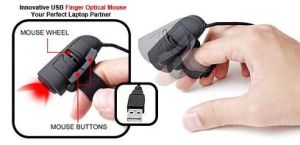
USB Finger Optical 3D Mouse
The USB Finger Optical 3D mouse is designed for the PC, notebooks or laptops. It is compatible with MS Windows 98/2000/me/XP/Mac OS 9 and above. It features a scroll wheel, left and right buttons and can be easily used on most surfaces. The only annoying thing will be having to type with it attached to your finger while it wobbles around. Still, for those who use the mouse more it could be handy for reducing RSI.

Product Page


DS to get 1-Seg Tuner

by Matthew on October 27, 2007

DS_LITE 1Seg Tuner
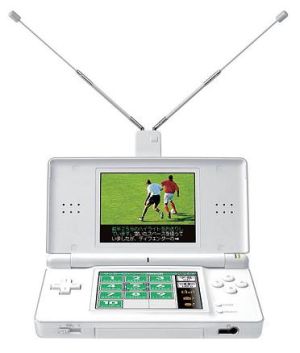
If you live in Japan, then as of November 8th this year you will be able to pick up a new 1-Seg TV tuner for your Nintendo DS Lite. The 1-Seg tuner makes use of the upper screen to display TV and on the bottom touch screen you will find a remote control. This tuner will allow you to watch the telly in most places in Japan where 1-Seg TV is available. Costing just €41 it isn’t a bad price at all.

Via: lifeatmost and akihabaranews


8GB MicroSDHC Cards Now Shipping

by Matthew on October 27, 2007

microsdhc-8gb
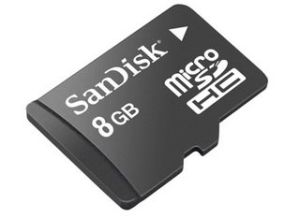
MicroSDHC cards are tiny measuring just 15mm × 11mm × 0.7mm (about a fingernail size) and now the latest versions from SanDisk are now shipping. These tiny memory cards have squeezed on 8Gb of storage space and will cost around $150. However, you can get a 6GB version for about $72 which kind of makes the 6GB version far more tempting.

Just check if your device is compatible before buying as MicroSDHC cards are not accepted on all devices.

Via: nokia-e90


USB Powered Paper Shredder

by Matthew on October 27, 2007

usbgeek-shredder
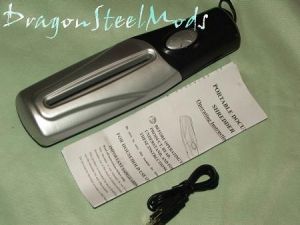
With identity theft all around us we must take care when chucking away our documents. The USB powered paper shredder is ideal to get rid of your documents securely. The shredder is portable and will fit in a laptop bag and can be carried around. There are 2 ways to power the device. The first is by USB (which is where it gets the name from), or you can use AA batteries should you not have a USB source anywhere near you.

Check out Dragon Steel Mods for a full review.


Power Brick Charger

by Matthew on October 26, 2007

Power Brick Charger
The Power Brick is a new battery device which is high capacity. It has a 2400Mah capacity allowing it to charge a regular mobile phone or iPod about three times before it needs recharging it’s self. It weighs less then 100g and can be charged by USB. Outputs on this device are a plenty too. It comes with “tips” for Nokia (x2), Samsung, Sony Ericsson, Motorola/Blackberry/mini USB, iPod, PSP and digital cameras. Also in the pack is a retractable USB cable which connects the tips to the battery. Full charge can be held for 3 months and the on/off switch is located on the side. So you do not loose all the bits and bobs included, the package comes with a small white case too.

For those who are out and about a lot, this small package could be a nice source of power should you need to make a call and your phone is dead.

It costs just £14.99 also which is not bad considering it contains all the above tips for a ton of devices.

Product Page


Password Protected Credit Card

by Matthew on October 26, 2007

password-protected-credit-card
Credit card fraud happens quite often around the world. PIN codes do not seem to be enough protection as people skim, duplicate and record what you are typing in to a PIN code machine. The latest idea is to have more security added. To use it a password is needed which is generated on the spot as and when needed. The cool thing about this credit card security device is that the pass wording system is actually on the card in the form of small numbered keys and an ultra thin screen. It is known as a credit card embedded authentication device and is made by two companies named Innovative Card Technologies and eMue Technologies.

To use the device you need to enter a secret PIN on to the cards keypad. A numeric password to use just once will appear on the screen. To use the card the password must be first entered on to either a web browser, ATM or in a store, followed by the card. No PIN number is entered on the actual receiving device such as the ATM. By switching where the PIN code is entered, the security is increased because of hidden cameras that could have been tracking what you entered on the keypad of the ATM. This device is not actually available yet, but there is mention of it floating around a lot of trade shows.

Nice idea! and I do hope to see security pushed even further with debit and credit cards.

Via: TechChee and OhGizmo