Search Results for: usb

Sony DVP FX850 Portable DVD Player

Son DVP FX850
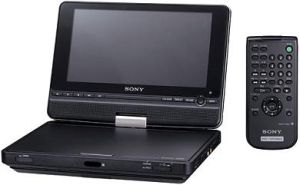
Sony have created a cool looking portable DVD player named the DVP FX850. It has a cool screen which swivels around in tablet form to allow easier watching in small places. The casing of the player is black which looks great. The screen is 8 inches with a resolution of 800×480 pixels. Formats supported are the usual DVD formats and other files such as MP3 and JPEG can be used.

One feature that I like is the ability to use a flash drive connected to the USB port to play files. Sonys usual stance is to make you use their own format, but here it has been dropped for something that is more standard. As well as having the features mentioned above the player supports DOLBY and DTS which really puts a lot in to this small package.

Via: OhGizmo

Ezex Navzen GPS

Ezex Navzen GPS
The Navzen N700 is a GPS navigation device that was shown over at CeBIT 2007. The screen is fairly large at 7 inches allowing for easier reading while driving. The screen is also touch screen which allows you to input your destination. Memory can be increased on the device through an SD memory card slot. As well as having the navigation software, the GPS device is also tucked inside. USB 2.0 allows for high speed connectivity between the device and computer so that files, maps, music etc… can be transferred quickly. Bluetooth connectivity is also included which we assume allows you to send files via your cell phone and possibly use the device as a hands free kit for your mobile phone while on the road.

The system runs Windows CE and has a 500MHz processor to help things run smoothly. Just looking at the huge screen and glowing buttons to the side makes this one stand out from the crowd. No pricing or availability dates are known yet, but we will keep you informed as we hear more information.

Via: UberGizmo

The Ultimate Smallest MP3 Player

Ultimate Smallest MP3 Player
In the image above you will see a seriously small MP3 player which doesnt lack features either. It has a small screen, 2GB of memory, can play MP3, WMA, ASF and WAV and weighs next to nothing. It does make you wonder why they didnt just build it in to the ear phones rather then spend all that time making a device so small you would loose it. Along with those standard features the MP3 player also has a built in FM radio receiver so that you are not restricted to your own music selection.

The Ultimate Smallest MP3 Player (that is its full name) is powered by a 3.7V lithium battery which we assume has plenty of kick to power this device for hours. Connectivity is provided via a USB cable allowing you to switch the music around.

It costs $99.95. Part of me thinks it is over prices for the size of the thing, although the smaller the package the harder it was to build.

Via: RedFerret

Seagate FreeAgent Go 160GB

Seagate FreeAgent
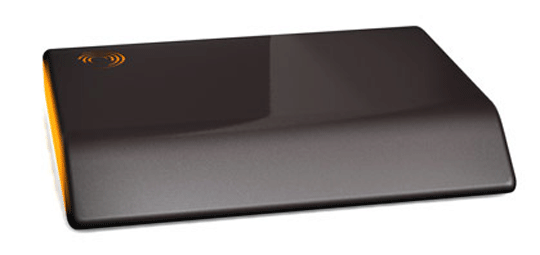
The Seagate FreeAgent is more then just a portable USB hard drive in which I thought it actually was at first. It is actually your whole computer environment that can be stored in your pocket. It is aimed at those who travel a lot on either business or pleasure and allows you to keep everything with you, including your computer settings. You can go to any PC with Windows USB 2.0 and connect it and you have your own PC right there to use. It is compatible with Windows XP and 2000 and just needs 2 USB ports to function.

Some of you might ask about using a laptop, and why would you need this. Not all of us have laptops and want to carry them around with us. Having this device will weigh you down by just 6oz and stow away in a pocket or your bag, but yet allow you to still fully use your computer while you are on the go. This is an excellent idea and suited to many people.

Via: CrunchGear

Infrant ReadyNAS NV – Full Backup Solution

NAS
Data storage has become more needed in each of our lives with digital cameras being used daily, music being downloaded, videos being watched and much more. The problem you will come across one day is that the harddrive of your computer which you store this data on will more then likely crash. If you are like me then you probably do not have backups of the data and still know inside that it would suck to loose all those precious photo memories.

The Infrant ReadyNAS NV+ is a full backup solution allowing you to store data on its drives. It has 3 USB ports, 4 x hot swap SATA drive bays. It comes in 2 configs. Either empty allowing you to purchase the discs or it comes full with 2Tb of storage available in RAID format. It connects to your home network via a gigabit ethernet port and can be used to store all your files on it.

With it having RAID functionality, this means that should a drive break down, then you just replace it with a new drive and no data is lost. This is due to the way a RAID system works. RAID puts files on more then 1 disk so that in the event of failure a new drive just gets repopulated with the files stored in a second location.

For the full review, check out Coolest-Gadgets.

OCZ Versatile Trifecta Flash Card

Trifecta Flash Card
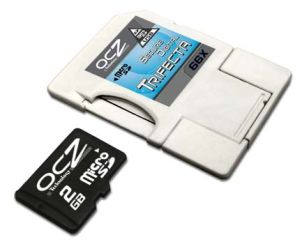
The Trifecta Flash Card from OCZ technologies is a unique 3 way compatible storage device. It works as a MicroSD, SD and USB key in one which allows easy transfering of files between several devices such as a laptop with USB and a phone with microSD. As transfering files is becoming more needed these days, it seems a logical step to include as many formats in 1 card so that no cables need to be carried around. Overall, I think this is an impressive device.

Two memory capacities are available allowing 1Gb or 2Gb of data to be stored wuth a read rate of 66X. The card comes standard with a 5 year warranty.

Product Page Via: MegaTechNews

Updating your own Nokia Firmware

Cellphoneforums have posted that official Nokia software is available to update the firmware on your mobile phone. Before you read on, just make sure you follow instructions step by step as doing something wrong does have the potential to break your phone. With the software being official, I decided to check out the Nokia.com website and sure enough, it is there. Excellent, time to check out my N73 and see what’s on offer. From doing a quick check on my phone of *#0000# I see that I am on V 2.X. A search of the product code on my phone shows I can upgrade to version 3.0638.0.0.1. To upgrade it is a matter of checking the current version and your version and then downloading the latest version from the website for your phone. There are 2 ways to download the latest firmware. The first is OTA (over the air) and the second is a download to your PC so you can transfer it over. My Nokia N73 does not allow OTA, so I will need to download to my PC and transfer via USB.

Some good news is that the upgrade process is fairly simple. If your phone is branded (locked to a provider) then it might not update. However, the software that updates your phone will tell you if this is the case to prevent you from bricking it.

Why do you need to update your firmware? The latest firmware fixes bugs in earlier releases. My N73 has a few quirky things about it and the reason for my upgrade will be to test to see if it fixes it from freezing from time to time while doing too many things at once. Other reasons are upgraded applications and different connectivity.

Let us know if you run in to any problems with the updates.

Updating can be done via Nokia

Wifi Finder from Linksys

WUSBF54G
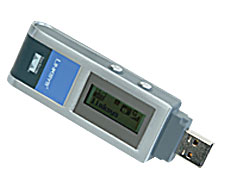
The WUSBF54G is a USB network adapter and also includes a built in wi-fi finder. It is capable of finding Wireless G and Wireless B signals and allows full connectivity and 128 bit WEP or WPA encryption. The USB network adapter has a built in LCD screen which shows network name, channel, signal strength and the security of the network. What sets this device out from the crowd is that it works while not connected to your laptop. You switch it on and it immediately shows networks in the area and if they are able to be connected to. If you find one then you can switch on your laptop, plug it in and then surf away. If multiple networks are found then a list is displayed ordered by signal strength. As free public hotspots are becoming more freely available, this device can help find those hotspots far quicker and get you working quicker.

The device costs $79 and could be well worth the investment for the frequent traveler.

Via: Coolest-Gadgets

Imation Flash Wristbands

imation_flash_wristband
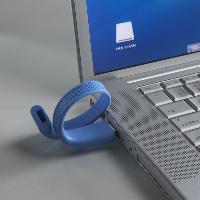
The Imation Flash Wristband is a flash device which you can wear on your wrist. It stores information on it just like any other USB flash drive would, but is just bendy instead of being a rigid block of plastic. The idea of this device is that you can wear your storage rather then have it hanging on a keychain or loosely in your pocket. The flash wristband is made out of rubber which protects the flash drive from knocks etc… The memory capacity of the device currently goes up to 256Mb and colours available are black and blue.

Using the device is as simple as any USB flash drive. You just plug it in to your XP, ME or 2000 based PC and away it goes. It is compatible with older OS versions like Windows 98, but a driver needs to be installed to get it working. Compatibility with Mac is also available.

Via: Imation

Military-grade Password Protection

Mandylion_Manager
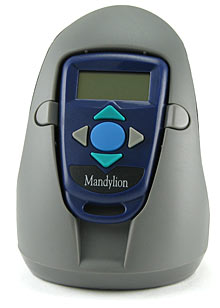
Passwords for most are a serious matter. We all have some kind of password to protect something. With hackers getting more advanced we often find the need to run more complicated passwords and change them each month. With this in mind the Mandylion Manager has been released which promises military-grade password protection. The device costs just $49.99 and can store up to 50 login passwords, combinations, codes and what ever else is needed. The device also has the ability to generate passwords on specific criterea set by systems. The password length can be up to 14 charachters long. Each password is stored in permanent memory that is tamperproof. Should the battery also die then the passwords are still safely stored.

If you manage a number of servers like me, or have a ton of passwords that are just too complicated to remember then this device is for you. The question needs to be asked…. what protects the password from being accessed? There are 5 buttons on the device and a sequence of these buttons needs to be pressed to access your passwords. As long as you remember that 1 sequence of button presses then you are good to go.

Features
* Manages up to 50 login records simultaneously
* Generates cryptographically strong passwords
* Complies with all DoD, Govt. & Industry Password Security Policies
* Multiple tamper-resistant features and lockout alarms
* Manages Root and Group passwords
* Cradle connection via USB
* Kit containing: token, a configuration cradle, Policy Master Configuration Software
* Dimensions: Approx. 2.5″ x 1.5″ x .375″ (65mm x 45mm x 10mm)
* One-year warranty

Buy it now from ThinkGeek

SnoopStick

SnoopStick
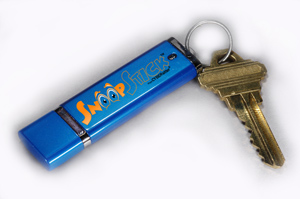
The SnoopStick is a way to keep track of computer usage. It seems like it is designed for those who want to keep track of their children or spouses computer habits. It is capable of holding 12 months worth of logs and has the ability to log users off, disable access to the internet.

You do not need to leave the device in the PC to use this software. All you need to do is get around 60 seconds access to the computer and you quickly install some software which comes on the memory stick. The monitoring components are supposedly hidden so that no one knows they are there. To get the information you need to just connect it to any USB port on any computer attached to the internet and it then downloads the latest logs. You do not even have to tell it what to do. Just plug it in, wait and remove it.

I personally think it’s a waste of time and if you feel you need a SnoopStick then maybe it’s time to move the computer in to a more busy room in the house 🙂

Via: GearDiary

y

Samsung SGH-F500

Samsung SGH-F500
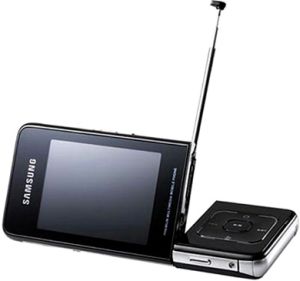
The Samsung SGH-F500 arrived at CeBIT this year. The screen is a 2.4 inch TFT, it has a 2 mega pixel camera, 400 Meg of built in memory, microSD slot. On the connectivity side there is Bluetooth and USB connectivity.

Via: TechEBlog