Search Results for: net

Infrant ReadyNAS NV – Full Backup Solution

NAS
Data storage has become more needed in each of our lives with digital cameras being used daily, music being downloaded, videos being watched and much more. The problem you will come across one day is that the harddrive of your computer which you store this data on will more then likely crash. If you are like me then you probably do not have backups of the data and still know inside that it would suck to loose all those precious photo memories.

The Infrant ReadyNAS NV+ is a full backup solution allowing you to store data on its drives. It has 3 USB ports, 4 x hot swap SATA drive bays. It comes in 2 configs. Either empty allowing you to purchase the discs or it comes full with 2Tb of storage available in RAID format. It connects to your home network via a gigabit ethernet port and can be used to store all your files on it.

With it having RAID functionality, this means that should a drive break down, then you just replace it with a new drive and no data is lost. This is due to the way a RAID system works. RAID puts files on more then 1 disk so that in the event of failure a new drive just gets repopulated with the files stored in a second location.

For the full review, check out Coolest-Gadgets.

Free Wi-fi Access for PSP Owners

Sony PSP
If you are an owner of a Sony PSP and frequent T-Mobile hotspots then you could be entitled to 6 months of free wifi access. Hurry though… there are only 362 days left to qualify for 6 free months. I have heard rumours that you also need to have the latest firmware, but as I am in the UK and this offer is for the US its a tad far for me to travel and test.

To get this working you need to follow these instructions…

Create a T-Mobile HotSpot Network Profile

1. Bring your PSP® system to a location that provides a T-Mobile HotSpot. (Refer to the T-Mobile HotSpot U.S. Location Map.)
2. Select (Network Settings) under (Settings).
3. Select [Infrastructure Mode].
4. Select [New Connection].
5. Select [Use Wireless Hotspot].
6. Select the T-Mobile HotSpot icon.
7. If you have an existing T-Mobile HotSpot account, select [Enter User Credentials]. Enter your user ID and password, and then press the right button. or If you do not have an account, select [Use Promotional Access] to sign up for a complimentary six-month T-Mobile HotSpot account . (To qualify for this promotional access, you must authenticate your PSP® system to the T-Mobile HotSpot network prior to March 28, 2008.)
8. Check the contents of the settings list.
9. Save the settings.
10. Perform a connection test. If you select [Test Connection], the system will connect to the selected access point.
11. Confirm the connection test results.
If the connection is successful, information about the network is displayed.

Via: Playstation

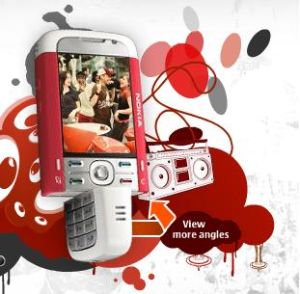
Nokia 5700 XpressMusic

Nokia 5700 XpressMusic
The Nokia 5700 XpressMusic phone was just announced. The 5700 is a 3G phone which has more style then your typical Nokia type phone. The keypad can be twisted to reveal dedicated music player keys. Sound is produced with a dedicated audio chip and played via built in stereo speakers and adjustable by a 5 band graphic equalizer.

The phone has a built in 2 mega pixel camera with 4x digital zoom. The screen is a 2.2 inch QVGA screen.

Features

– A built-in FM radio tuner featuring Visual Radio – find out what song is playing, who sings it, and other artist information.
– Mpeg4 player and advanced editor – Edit your videos on the spot with the master set of different effects and options and create new views with your own video content.
– Email: IMAP4, POP3, SMTP, Support for IMAP IDLE, OMA e-mail notification, MIME. Support for attachments: (.jpg, .3gp, .mp3).
– Hot swappable slot for microSD memory card, with options to expand up to 2 GB with microSD card
– Bluetooth 2.0
– Push to talk over cellular network (PoC)

Via: Hotphonenews

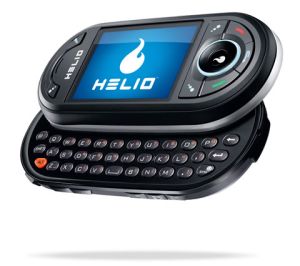
Helio Ocean

Helio Ocean
The Helio Ocean is set to be a great mobile device. It has a dual slide keyboard offering full QWERTY and a number pad. The connectivity is provided through 3G networks which allows for streaming content. The camera is a 2 megapixel camera with a built in flash. As well as the standard features expected, this phone has GPS, full HTML browser, a large 2.4 inch screen, stereo speakers and 200Mb of internal memory. Extra memory can be added through a microSD slot up to 2Gb on the current firmware.

The Helio Ocean will be released in the Spring in the US. More details will follow as they arrive about this great looking phone.

Via: SlashGear

Slingbox On Cingular 8525

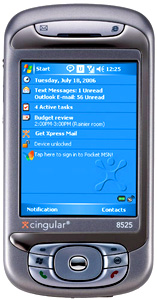
Cingular 8525
The CIngular 8525 is a Windows Mobile 5.0 smartphone device with a 400MHz processor, 2.8 inch screen, a full QWERTY keyboard as well as plenty of connectivity through 3G and wifi.

4Wrestling has managed to get the device running Slingbox (video below). It was connected over Cingulars wireless 3G network and quality looks great

FlashPez – The Pez Flash Drive

FlashPez
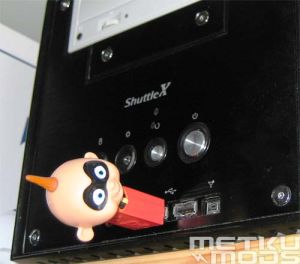
Many flash drives are coming out with fancy new features such as LCD displays showing memory usage, titanium ones which are super strong. However, I have not seen or even thought of modding a Pez dispenser to make in to a flash drive. This is exactly what Metku did. In the picture above we see a familiar character from the Incredibles converted over in to being a flash drive.

Check out all the pictures and instructions at the link below so you can make your own flash drive Pez dispenser.

Via: Metku

Talking Hands Free Lips

Talking Hands Free Gadget
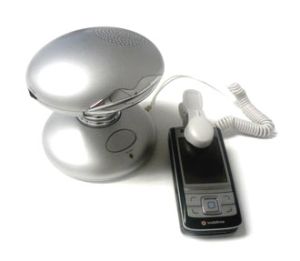
If you want to free up a hand while working at your desk then you need to grab one of these talking hands free gadgets. The device has a speaker, microphone, and a pair of silver lips which talk away in sync to the conversation.

The lips cost 17.95 pounds in the UK and are available from here.

Google Earth – Wifi Mesh

Skycontrol Google Earth Wifi Mesh
Using a mixture of a Wifi Mesh on top of Google Earth can help give a birds eye view of how a wireless network mesh is running. As seen in the picture above the SkyControl software collects node data with GPS coordinates and link states. This then creates a satellite based image in Google showing the status of the mesh.

Skycontrol is used in a NOC (Network Operations Centre) and allows you to manage and see a whole network based on a map system. This eliminates the need for manual mapping techniques and can give a real time status to the engineers.

Overall this could be a valuable took for those running a wifi mesh and help track problems and provide accurate maps to find and solve problems with in a short period of time.

Via: SkyPilot

HTC X7500 UnBoxing

HTC X7500 UnBoxing
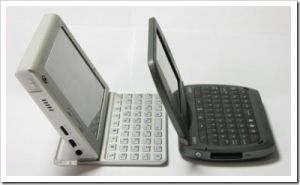
On the Go Solutions have pics of unboxing a HTC X7500. A quick run down of specs show this device to have a vast array of features and well worth looking in to. Included in the box is a travel charher, sync cable, stereo headset with mix, stylus, battery and case. It is supported on GSM networks (AT&T 1900Mhz, Cingular 850/1900Mhz and T-Mobile 1900Mhz.

Technical Specs
* Windows Mobile 5.0
* 624 MHz processor
* 3.0 MP Camera
* 256 ROM / 128 RAM
* Built in GPS Receiver
* 8 GB Hard Drive
* MP3 Player
* 3.0MP Camera
* Width: 3.85 inches
* Length: 5.25 inches
* Thick: 0.63 inches
* Screen: 5.0 inch TFT
* Weight: 12.6 oz
* Battery: 2200mAh
* GSM Unlocked
* HSDPA: 850/1900
* UMTS: 2100
* Quad-band Phone
* 850/900/1800/1900
* GRPS/EDGE
* Bluetooth v2.0
* WiFi 802.11 b/g
* Mini SD Slot
* Internet Explorer
* Pocket Outlook
* Pocket Excel
* Pocket Word
* Pocket Office
* Pocket PowerPoint
* Media Player
* DirectPush Mail
* Pocket MSN

Pictures of the unboxing event can be found at the link below.

Via: OnTheGoSolutions

Wifi Finder from Linksys

WUSBF54G
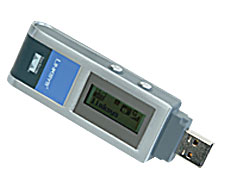
The WUSBF54G is a USB network adapter and also includes a built in wi-fi finder. It is capable of finding Wireless G and Wireless B signals and allows full connectivity and 128 bit WEP or WPA encryption. The USB network adapter has a built in LCD screen which shows network name, channel, signal strength and the security of the network. What sets this device out from the crowd is that it works while not connected to your laptop. You switch it on and it immediately shows networks in the area and if they are able to be connected to. If you find one then you can switch on your laptop, plug it in and then surf away. If multiple networks are found then a list is displayed ordered by signal strength. As free public hotspots are becoming more freely available, this device can help find those hotspots far quicker and get you working quicker.

The device costs $79 and could be well worth the investment for the frequent traveler.

Via: Coolest-Gadgets

SnoopStick

SnoopStick
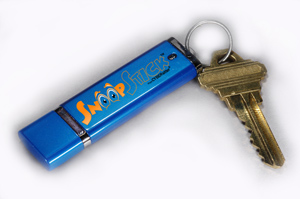
The SnoopStick is a way to keep track of computer usage. It seems like it is designed for those who want to keep track of their children or spouses computer habits. It is capable of holding 12 months worth of logs and has the ability to log users off, disable access to the internet.

You do not need to leave the device in the PC to use this software. All you need to do is get around 60 seconds access to the computer and you quickly install some software which comes on the memory stick. The monitoring components are supposedly hidden so that no one knows they are there. To get the information you need to just connect it to any USB port on any computer attached to the internet and it then downloads the latest logs. You do not even have to tell it what to do. Just plug it in, wait and remove it.

I personally think it’s a waste of time and if you feel you need a SnoopStick then maybe it’s time to move the computer in to a more busy room in the house 🙂

Via: GearDiary

y

13 tips for Improving CameraPhone Pictures

For those who use camera phones, you might notice that you do not always get a decent shot with the camera. Devices are becoming one over the last few years with features like cameras, mp3, internet, email and more all converging in to 1 device. However, the camera although it could be 2 – 3 megapixels does not always deliver what you want. This can be for many reasons such as lighting, distance, stability, digital zoom and more. Digital Photography Weblog have created a 13 step guide to creating the best possible photos from your camera phone. It is well worth a read. The titles are below, and please click through to read the full article as it is worth it.

1. Well lit subjects
2. Get Close
3. Keep it Still
4. Edit images later
5. Dont Throw Away mistakes
6. Avoid Using the Digital Zoom
7. Experiment with White Balance
8. Take loads of Shots and Experiment
9. Follow Rules of Composition and then Break them
10. Keep Your Lens Clean
11. Observe Camera Phone Etiquette
12. Rename your Images
13. Use the highest resolution possible on your camera phone

Via: Digital Photography Weblog

y