Search Results for: led

The Dash Datalink GPS Device

Dash Datalink GPS
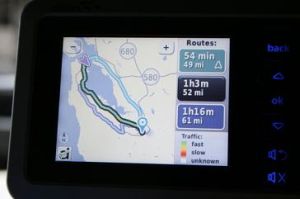
This GPS device not only has a GPS receiver inside to help with navigation, but it also boasts cellular data links too. The cellular connectivity allows Yahoo Search to be used to find nearby points of interest and once found, you can set the device to navigate there. Also with the cellular link you can download live traffic data. The device will then plan several routes around bad traffic and roadworks giving you the option of which route to choose. ETAs on each route are also given allowing you to work with your local knowledge and plan what works best for you.

Via: Gizmodo
Sony Ericsson – TrackID

Sony continue to churn out some nice features on their W range of mobile phones. The latest feature is named TrackID in which you can record a sample of a tune you like, submit it and then comes back the answer to what the song is called, what album it is from and who the artist is. This is a very innovative idea from Sony which will allow many an annoyance to be solved when you just cannot remember the track that is playing. You also get the option to have the details sent to you as an SMS message with the service.

Via: Gizmodo

In Flight Wifi coming to the US

AirCell will be bringing Wifi access to airplanes soon. It will use the same frequency that air phone services used to use and provide transfer speeds the same as what they would be on the ground. Cost for the service is expected to be $10 for the day which depending on what you use it for it could be well worth paying that.

The service at first will not allow VOIP services such as Skype, Vonage V-Phone etc. although it would be possible and might be opened up at a later date. The equipment needed can be installed overnight for $100000 and the costs that airlines run in to for this would be made back with a revenue share with AirCell.

The services are set to be available with in 12 months allowing the whole cabin of the plane to be a flying hotspot for its passengers.

What are your thoughts on this? I am personally ok with this as time wasted travelling can be put to productive use. However, I am not keen on the idea of VOIP being enabled although it might be useful to have cheaper calls in another section of the plane for emergency calls home etc…

Via: WSJ

Belkin Flip – Share your Monitor

Belkin Flip
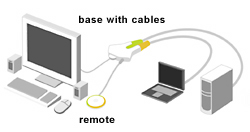
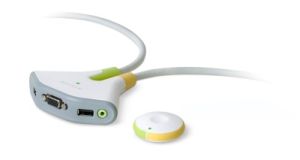
Belkin has launched the Flip which allows easier access to sharing a monitor. The device sits on your desktop and has a remote control. When you push the button you instantly flip your monitor from one PC to another. As well as sharing the monitor you also share your keyboard, mouse and speakers. This is ideal for those who have 2 computers set up but space for only 1 monitor on the desk.

The device features a 2 colour LED which shows the status of the flip and which computer it is currently displaying. Prices for the device run from $49 – $79 depending on if you go for the wireless remote version.
Flip Diagram

Via: PopGadget

Free Wi-fi Access for PSP Owners

Sony PSP
If you are an owner of a Sony PSP and frequent T-Mobile hotspots then you could be entitled to 6 months of free wifi access. Hurry though… there are only 362 days left to qualify for 6 free months. I have heard rumours that you also need to have the latest firmware, but as I am in the UK and this offer is for the US its a tad far for me to travel and test.

To get this working you need to follow these instructions…

Create a T-Mobile HotSpot Network Profile

1. Bring your PSPĀ® system to a location that provides a T-Mobile HotSpot. (Refer to the T-Mobile HotSpot U.S. Location Map.)
2. Select (Network Settings) under (Settings).
3. Select [Infrastructure Mode].
4. Select [New Connection].
5. Select [Use Wireless Hotspot].
6. Select the T-Mobile HotSpot icon.
7. If you have an existing T-Mobile HotSpot account, select [Enter User Credentials]. Enter your user ID and password, and then press the right button. or If you do not have an account, select [Use Promotional Access] to sign up for a complimentary six-month T-Mobile HotSpot account . (To qualify for this promotional access, you must authenticate your PSPĀ® system to the T-Mobile HotSpot network prior to March 28, 2008.)
8. Check the contents of the settings list.
9. Save the settings.
10. Perform a connection test. If you select [Test Connection], the system will connect to the selected access point.
11. Confirm the connection test results.
If the connection is successful, information about the network is displayed.

Via: Playstation

Concept MP3 Watch

Concept MP3 Player
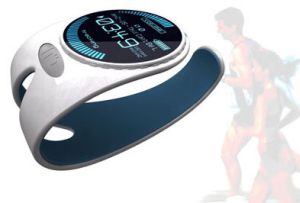
Nathan Davis has created the concept MP3 player watch which is a silicone band that you wear on your wrist. It features an OLED display under a layer polycarbonate. To listen to the music, you need no wires. This watch features bluetooth technology along with bluetooth headphones to send the audio wirelessly.

This is another cool watch design from Yanko Design that we would love to see hit the market. No doubt in the next year or few this type of watch will be readily available.

Via: Gizmodo

Virtual Star Destroyed

Exploding Star
The task of blowing up a virtual star has not been easy. It has taken years for developers to create the code to do this. Finally it has been done and a 3D simulation has been made which shows the step by step process in quite a bit of detail.

The movie unveiled a complex, yet orderly, series of events that concluded with a bang. Split seconds before the stellar finality, a virtual flame bubble spanning about 10 miles in diameter formed near the center of the white dwarf. Immediately the giant bubble jetted the roughly 1,200 miles to the star’s surface. One second later, at the opposite end of the star, this flame crashed into itself and triggered the detonation.

Check out the videos over on Space to see how a star would explode.

DarkLabel Retroxis Phone

DarkLabel Retroxis Phone
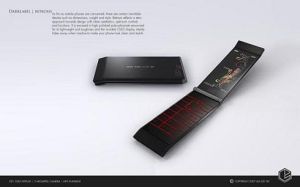
Yanko Design have yet another cool concept phone for showing off today. This time it is the Darklabel Retroxis which aims at cutting the dimensions down along with weight, but increasing style. Looking at the images above you can certainly see that this concept device looks cool. It is covered in high polished polycarbonate which is lightweight and strong. The screen is OLED and when off, appears to not be there. If only this concept was made in to real life.

Check out more details and the Revol watch at the link below.

Via: YankoDesign

Creative USB Cam Optia

Creative Cam Optia
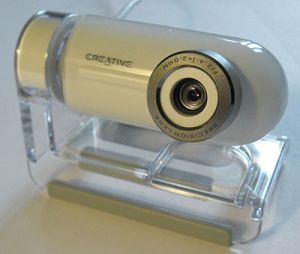
The Creative Cam Optia is a new USB webcam to become available. With other webcams there are drivers which always need installing first to allow the camera to work on your system. However, this camera is different in that it uses a new USB video class called UVC which gets rid of the need to install drivers. UVC is a new class which works in a similar way to flash drives which plug in and go. As flash drives use the same standard, there are no drivers needed. UVC aims to follow this route. With more and more providers getting in on the UVC scene, you will start seeing cameras compatible cross platform such as on the PS3. You webcam will then work with different machines in your house and stop you needing to buy a dedicated cam for the PS3, Xbox etc…

The Creative Cam Optia is one of the latest cameras to use this technology and it looks like a great cam from the pics I have seen. A full review can be found at EverythingUSB.

Via: OhGizmo

Solar Powered AC – SolCool Millenia

Solar Powered AC
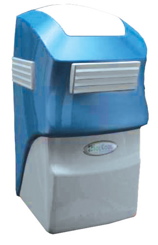
3500 dollars will get you a solar powered AC unit called the SolCool Millenia. The sun powers the device and the hotter it is the colder the air can be pumped out. If it is still hot and AC is needed then the device has a 24 hour battery to keep things cool. Overall a nice idea I think which is both good for the user and the environment.

Via: OhGizmo

Neonode TouchScreen N2

Neonode TouchScreen N2
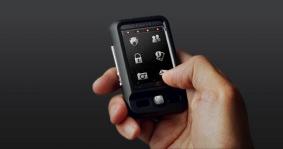
The Neonode N2 has been introduced and is a touch screen phone and media player. The device has no buttons and it controlled only though the touch screen. The touch screen has a virtual keyboard that can be made visible for typing SMS messages and searching or adding contacts. The memory is provided by MiniSD which stores all your music, contacts etc… If you want music on the device then drag and drop it on there. The device is a nice size and allows full operation with one hand. The touch screen uses its own patented screen technology and rather then it actually being a touch screen, it uses smalls beams of light across and down the screen which creates a grid. When a beam is crossed it can translate that in to a location on the screen. The N2 appears to be a good solution and competitor to the iPhone. I do not know if it is multi touch at the moment, but with a screen technology as it is, then that will keep people happy for a while.

On the media player side of things, a 3.5mm regular headphone jack is available which allows you to use any regular set of head/ear phones with the device.

Via: Gizmag

Indoor RC Plane – Aero Soarer

Aero Soarer
Indoor RC toys are becoming more popular over the last year or so. The Picoz RC Helicopter is one of my favorite due to it’s tiny size and the ability to fly around your living room and not destroy anything.

Tomy have now released the Aero Soarer which is an indoor RC plane. It weighs next to nothing with it being made from polystyrene (Styrofoam for you in the US) and is light enough to fly without much power. The planes controller has 2 functions. The first is the controller for the plane which allows you to increase the the throttle which makes the plane go up and decrease to go down, also it allows you to steer the plane. The second function is that it doubles as a charger for the plane. There is no mention of how long it takes to charge, but average usage for RC flying toys are around 5 – 10 minutes of flying on about 20 – 30 minutes of charging.

The Aero Soarer is also customisable although I am not 100% sure yet how you can customise it. Maybe you can chop off a bit of the wing and shape it better, or maybe add LEDs.

It is available from Play-Asia for $19.90.

Via: NerdApproved