 If you own an iPad it is possible to play SNES games on the device. Lifehacker has created a four-step tutorial that shows you exactly how to get playing SNES games on your iPad along with the steps to pair up a Bluetooth Wii Remote to play the games with. If you don’t have a wiimote and prefer to use an iPhone or iPod touch as a controller then an alternative SNES emulator is available.
The first app looked at in the video is called SNES4iPhone which costs $5.99 and requires you jailbreak the iPad. Jailbreaking an iPad is quite simple thanks to apps like SpiritJB that allow a simple app to run on your Mac or Windows PC and push a button while the iPad is connected.
The full tutorial which can be found here, goes through each of the steps which show you how to jailbreak the iPad, install the SNES for iPhone software and sync up your Wii remote control. Once done, the video then shows you how to add games to your iPad so you can play them. [Read more…]
 Barnes & Noble has updated it’s iPad app to now include brightness controls. It’s not the most exciting of updates to hit an iPad app, but it’s certainly a handy feature to be able quickly lower the screen brightness within the app rather than closing it out and going to the Settings menu to make the change.
 The team over at Geeky Gadgets have created another home-made stand. Previous versions included the
  Zlin are unveiling a new plane soon. The new plane is called the iCub and as the name suggests, it integrates Apple [AAPL] technology in to the cockpit.
 The Apple iPad screen doesn’t support pressure-sensitivity. It merely just knows when your finger touches the screen and acts accordingly.
 A video has been uploaded to Youtube that demonstrates Osmos HD that is being released on July 8th.
 The Wired iPad app is dropping in price. The first edition of the app cost $4.99. Conde Nast are dropping the price by a dollar which knocks 20% off the price taking it down to $3.99. It’s not a huge saving by any means, but at least it’s a little cheaper than it was before.
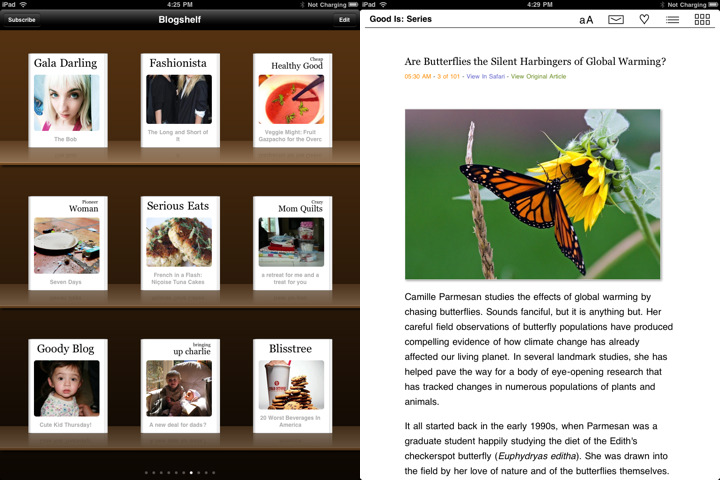 Blogshelf is an RSS reader app that gives the feeds you read a book like appearance. The software is built for the Apple iPad and makes use of the large screen to make feed reading more comfortable and easier to read.
 Apple [AAPL] announced yesterday that it had shifted 3 million Apple iPad’s in just 80 days. That’s an impressive number considering a few criticisms saying that people wouldn’t be interested in it.
 Some estimations indicated that Apple [AAPL] could be shifting in the region of 1.2 million iPads per month. Estimates also indicate that Apple could be shifting 2.5 million per month by the end of this year making it a huge success.
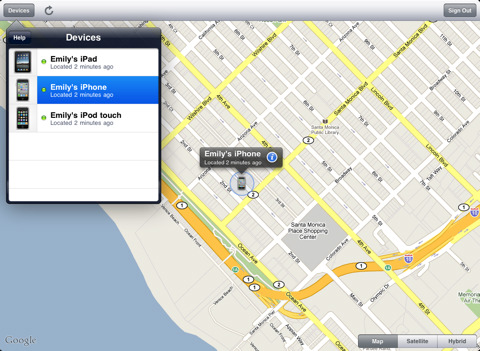 Apple [AAPL] has launched a new app called Find My iPhone. The app is part of the MobileMe service and will be familiar to those who already use the service through their computer.


