Search Results for: USB

Samsung USB Monitors – Syncmaster 940UX

Samsung USB Monitors
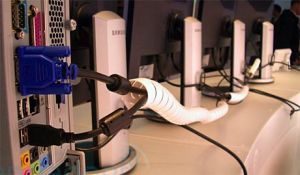
The Samsung Syncmaster 940UX is an LCD panel which connects to your PC and gets it’s signal via USB. The monitor does not have any VGA or DVI connectors on it. The 940UX can be used as any regular screen but it does have a catch. It seems like the processing is done by the CPU of the PC and not any dedicated hardware. According to Engadget up to 6 screens can be daisy chained to each other and make use of just 1 USB port on the computer. Unfortunatly doing this does not allow for much video to be processed and a beefy PC is needed.

This is a good step forwards in technology though as many devices these days connect via USB and it makes sense that a screen should also connect via USB. We will need to watch how this all pans out over the next few months and see if performance is reported as an issue, or if additional hardware is best being used to get the quality you really need on the screen.
Via: Fosfor and Engadget

Titan USB Memory Stick – Its Strong

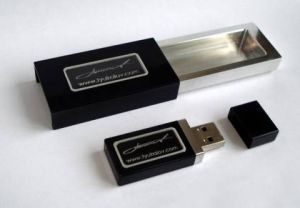
Slava Tyukalov USB Memory Stick - Its Strong
Slava Tyukalov decided it would be cool to go and create USB flash drive that is ultra tough as well as waterproof, shock resistant, vibration resistant and also anti static proof. Along comes this device which is built from graphite and aluminium which is then coated in titanium to add extra strength. Only 100 of these will be made and will come in 1Gb and 2Gb sizes. The videos after the jump show the static test and crushing test and are well worth watching.
[Read more…]

Dr Who Tardis USB Hub

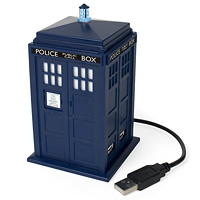
Dr Who Tardis USB Hub
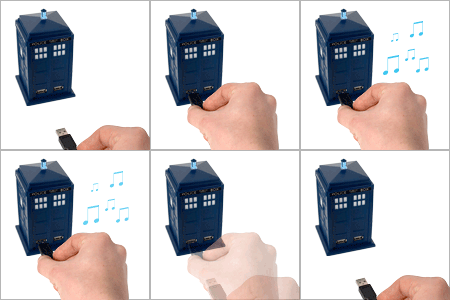
USB hubs are seriously handy devices, but yet the majorty need to stay hidden as they are usually just a box with a number of connectors in. The Dr Who USB Tardis is different in the way that it’s just that… a Tardis. For those of you who are not familier with what a Tardis then it is a Time and Relative Dimension in Space which is in the form of a 1950s London police box. On a technical side it is a 4 port hub, features a blue flashing light and also makes the well known tardis noise each time you connect a USB device to it. As an added bonus it also features a demo button just incase you get bored of connecting and reconnecting all your USB devices.

Dr Who Tardis
The USB Tardis is available from Firebox for 19.95 pounds and unfortunatly does not allow you to travel in time although I have been told from a secret source that time travel will be available in version 2 when it comes out later this year 😉

Buy it from Here.

USB Hub with PS/2

USB PS_2
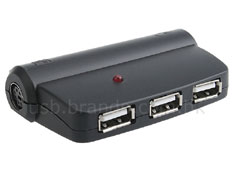
If you are still using slightly older technology such as PS/2 ports on your keyboard or mouse then this USB Hub could be an ideal option. If you are lacking the connections for PS/2 then this hub comes with 2 of those connectors built in and allows full connectivity for those older devices. At $12.50 it is priced well too.

Via: UberGizmo

Memory Infinite – Concept USB Storage Device

Memory Infinite
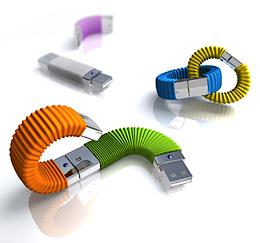
The Memory Infinite is a concept idea thought of by Vicky Wei. The 3D models above were created and illustrate an example of linking multiple USB flash drives together to make the storage larger and appear as 1 virtual drive. As larger flash drive come on sale it no longer means the end of your old drive. The new drive can simply plug in to the back of the older drive and the storage space is increased. With it being concept there is no official date of this being released, if ever. The only questions that come to my mind is… how many drives would you want to link together before you have a serious long chain of them, and would it actually work as 1 drive.

This is still a nice idea and the 3D images do make it look cool.

Via: OhGizmo

Wireless USB

Wireless USB
Since the launch of USB, this connectivity has enabled around 2 billion USB wired devices to be sold around the world. The time has now come to drop these wires while enjoying high speed transfers wireless style. Wireless USB is capable of transferring data at 480Mbps at a 3m range and 110Mbps at a 10m range. If you are like me and have a number of USB devices connected to your computer then the benefits are obvious. Digital cameras, iPods and a number of other USB devices soon stack up and the cables can become a mess. By using WUSB you are able to flick a switch, see the device connect and transfer the files.
[Read more…]

Wiihacks – Wiimote Controlled USB Missile Launcher

USB Missile Launcher
Here we go with the latest wiihack. This time you can controll with the wiimote a USB missile launcher. Now dont misunderstand here… this missile launcher fires out nothing but foam rockets. I just didnt want you thinking that you could rule the world with one of these things. Still, it’s a cool idea and well worth looking at if you want to have a good laugh.
[Read more…]

USB Shaver

USB Shaver
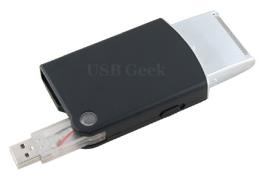
There are tons of USB devices out now ranging from the seasonal christmas tree, rool up piano and more. We now have the rechargeable USB shaver which is charged via your laptop. This is very useful for the business traveler who forgets their regular shaver or a compatible power supply. There isnt too much to the USB shaver. It has an LED which lights up when it is being charged and the USB connector which can fold in to the case to compact it even more.

It weighs just 74 grams and power consumption is low and it shouldnt kill your battery in your laptop.

Via: Coolest-Gadgets

Rapid Transit USB

Rapid Transit
With the Zune that just hit the market, there is now the ability to transfer files wirelessly from Zune to Zune. Of course an iPod is not capable of this yet as no wireless functions are built in. No doubt the next gen version will more then likely have this feature. For now you will have to settle with the Rapid Transit USB to USB option. Basically you can connect 2 devices to the Rapid Transit and this will allow for quick file transfers between the two devices. The Rapid Transfer has a built in screen in which you can control where to copy and place the files on the devices which gives full control and helps you not write over anything you shouldnt.

The Rapid Transfer has a rechargeable battery that is handy while travelling with your music or files. Currently the device follows along with Apples DRM and this locks access to files until the ipod is resynced and a password is entered. Music not purchased from iTunes we can assume is not restricted when copying it over.

Available from Herrington for 129.95, it makes for an expensive way to transfer music. Keep in mind it’s not just for the ipod though and can be used to transfer documents, images, video and more from any 2 types of devices.

Via: OhGizmo

USB Flash Drive Recycling

USB Flash Drive
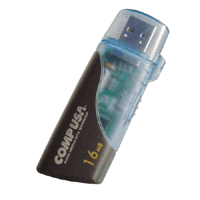
If you have an old unused flash drive (at least 16Mb) then do not chuck it away. Although it may be of no use to you any more there are thousands of people who could benefit from this old flash drive. Inveneo are collecting these to hand out to developing countries to help students and aid workers to share information a lot quicker.

More details of this great scheme can be found at Inveneos website.

Via: Engadget

USB Bowling Ball

USB Bowling Ball
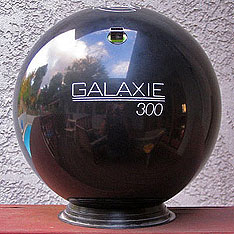
Loosing a USB flash drive can be seriously annoying and dangerous if you have sensative information on there. Well… this new bowling ball USB drive will not have a chance of being lost because it’s a full sized bowling ball and weighs 16lbs. Unfortunatly it now takes it out of the ultra portable and also out of the carry it around on a regular basis type thing. Still all good though.

The bowling ball is not available to buy as it was custom made by someone who didnt want to loose another USB flash drive.

Via: UberGizmo

USB Hub Mouse Mat

USB Mouse Mat
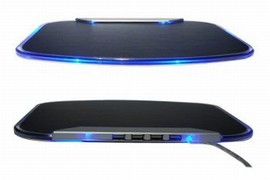
The problem I find these days is that I have so many USB devices that I need to plug in daily that I dont want to climb behind the PC to my USB hub and plug them in each time I need to do something. The USB Hub and Mouse mat helps solve this problem by providing 4 USB ports on the back of the mat to plug your devices in to. This is perfect for those sets of devices that only need to be temporarily used while you can leave the rest behind your PC.

The mouse mat has Blue LED’s to indicate when a port it in use. It requires no external power as it mimicks self power mode. It supports v 2.0 of USB and can work at 12M or 1.5Mbps.

Via: vTec