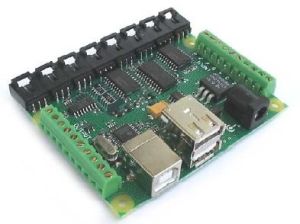
Phidgets USB sensors are used for monitoring environmental factors such as temperature, light, motion, magnetic field and vibration to name a few. When buying the product you need to choose the phidgets you want to use. According to the Phidgets website you do not need any technical knowledge, no programming skills and you do not need to know anything about communication protocols. In fact, they only recommend that you have an imagination. This opens up Phidgets to be used in any number of ways you could possibly think of. One project someone made is Tetris Weightlifting. This game is a highly modified version of the game in which lifting weights actually controls the pieces. You can imagine the pain on even the strongest mans face when he gets to level 9.
Search Results for: usb
Phidgets USB Sensor Kit
The USB Money Clip

You can get hold of a lot of USB devices these days. The next in line is the USB Money Clip. It is basically a clip that you hold money together but in this case the clip is a USB flash drive. I guess the idea behind this is that you either carry money everywhere you go and therefore always have your USB flash drive, or the other alternative way is that you always loose your USB flash drive, but when you have a couple of G attached to it you will never forget that.
USB Digital Microscope
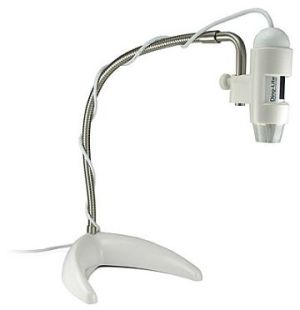
The USB Digital Microscope allows you to capture images in high quality and very close up. With it being USB, it connects to your PC and then shows the images on screen. The software which comes supplied with the USB Microscope allows you to zoom in up to 200X and create screen shots of those objects. As well as taking still pictures, you can also use time lapse movies for items that change over time. The Microscope part is detachable from its stand which allows you to get up close to items.
Digio USB Flash Drive
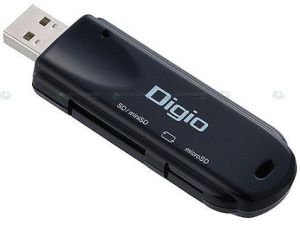
Some great ideas for flash drives have been showing up over the last couple of years. We only just posted about the Pocket XP flash drive which allowed you to keep a backup of your OS should you need to do an urgent install when on the road. The Digio is another example of a great idea. This time the flash drive includes SD and MicroSD slots so you can transfer data to and from your SD cards via the flash drive. Its a simple idea which could be handy for those situations where you need to quickly backup data from your camera or mobile phone.
Cool Concept USB Drives
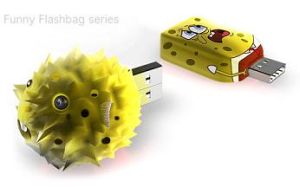
Concept devices tend to be cool with some weird and wonderful ideas. These new USB flash drives are no exception and extremely cool although probably a little bit crazy. Sponge bob is the first drive which starts its life as a USB drive and when the drive fills up with data it slowly changes in to a blowfish. This is a unique way of showing how much data is on the flash drive. It is supposedly going to work with a micro pump powered by USB which can inflate the cover of the drive.
The next USB drive is some kind of weird Orange. Again, it works by the same way the sponge bob drive does in that it is inflated according to the amount of free space available on the USB drive. More pictures after the jump.
[Read more…]
Belkin Network USB Hub
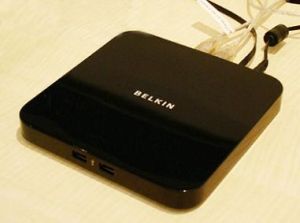
Belkin is set to release a network USB hub which allows you to connect to USB devices wirelessly. The hub makes it appear that the USB device is right there connected to your machine. This type of hub is very handy for those networked type of devices like printers as the built in Linux software allows certain readouts from the printer to be passed to the machine connected wirelessly. The hub features 5 USB 2.0 ports with 2 of them mounted on the front and 3 on the back of the device.
The Belkin Network USB Hub will be on sale in the US in June for $130 with the UK version following a little later.
Via: RegHardware
USB Battery Charger – The Energizer USB Duo

Energizer are well known in the battery market and have been creating batteries for as long as I can remember. They have created a new type of rechargeable battery which is named the USB Duo. The duo indicated 2 different options and with having USB in the name it probably isnt that hard to work out what it does. The USB Duo charger is capable of charging batteries via USB or a regular wall socket. To move in to the more technical world they also have created some software which allows you to watch the batteries charge on the screen of your computer. Now I can think of a million more interesting things to do, but I guess they are catering for all types of users 🙂
The charger comes in 3 colours which are red, yellow and blue and it costs $14. It is capable of charging both AA and AAA type batteries. 2 AAA batteries are included with the charger.
This device reminds me a little of the USB Cell although I think this version is far more flexible.
Via: Gizmodo
USB Heated Gloves

If you ar like me, then your hands often get freezing while working on a computer this time of the year. Along comes USB Heating gloves. This is one of the more useful USB devices I have seen in a while and is an excellent idea. To get it to work, you put them on your hands and then plug them in to an available USB port. Around 5 minutes later your hands will start to feel the warmth and productivity at that point begins to increase as you can now type again. If you are far away from the base unit of your PC then then each glove has a 46 inch cable attached providing enough room to move your hands and not feel fastened to the desk.
Geardiary got their hands on a pair of these gloves and did a full review.
Via: GearDiary
Wii Remote USB Charger

If you are worried about running out of batter power in your all important Wii Bowling match then you need not worry any more. The Wiimote USB charger allows you to dock your Wiimote in a USB cradle and charge it up when not in use. This will ensure that every time you want to play you will always have a fully charged controller.
Power for the cradle is gained from the USB port on the back of the Wii console meaning no additional power outlet is needed. You are not restricted to using the USB port on the Wii and can use any USB for a PC, laptop or any other device with a USB output. The battery in the Wiimote is Lithium-ion and does not have problems with memory effect like other types of batteries can.
Product Page Via: Coolest-Gadgets
Solar Powered USB Flash Drive
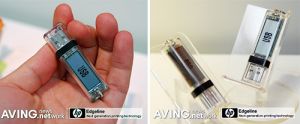
Shenzhen Truth Digital Technology, or TRUS has created a USB flash drive with LCD display. The display appears to be used for showing storage space available, although having a file browser could happen too. We doubt the latter part though. The device also sports a solar panel which we guess is to keep the screen powered.
The device doesnt look too exciting to be honest although showing used space could be ok if you have a number of flash drives to choose from.
Via: OhGizmo
Creative USB Cam Optia
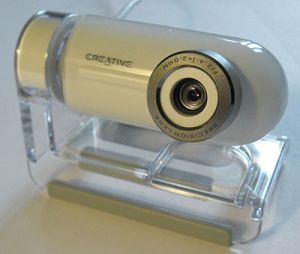
The Creative Cam Optia is a new USB webcam to become available. With other webcams there are drivers which always need installing first to allow the camera to work on your system. However, this camera is different in that it uses a new USB video class called UVC which gets rid of the need to install drivers. UVC is a new class which works in a similar way to flash drives which plug in and go. As flash drives use the same standard, there are no drivers needed. UVC aims to follow this route. With more and more providers getting in on the UVC scene, you will start seeing cameras compatible cross platform such as on the PS3. You webcam will then work with different machines in your house and stop you needing to buy a dedicated cam for the PS3, Xbox etc…
The Creative Cam Optia is one of the latest cameras to use this technology and it looks like a great cam from the pics I have seen. A full review can be found at EverythingUSB.
Via: OhGizmo
USB Grilling Device
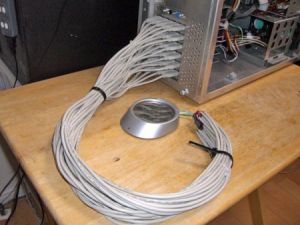
We continue to see some cool and some crazy USB devices. This one is king of crazy though… If you have a spare 30 USB ports laying around and need to grill something up then mix the 2 together and you get a fully working USB grill. The photo above of the system uses a motherboard with a 500W PSU, it uses 6 x 5 port USB cards which are USB 1.1. Only 1.1 was needed because although USB 2.0 is quicker, that doesnt mean your burgers will cook any quicker 😉
For a full look in to this crazy project, check out the translated page with instructions on how to make it. Videos are also included at the bottom of the linked page.


